YouTube Banner Size and Safe Area for Channel Art
Published 2026-09-20 · Updated 2026-09-26 · 5 min read · Alexander, automation engineer
TL;DR
- YouTube Help gives 2048 × 1152 pixels (16:9) as the minimum banner size, and 2560 × 1440 as the recommended size, especially for TV.
- At the minimum size, the safe area for text and logos is 1235 × 338 pixels.
- The file should be 6 MB or smaller, and without shadows, borders or frames added to the image.
- The banner is cropped differently on different devices, so anything outside the safe area may not be seen.
A channel banner is one image that has to work on a phone, a laptop and a television. YouTube handles that by cropping it, which means the layout decision is really a decision about what survives the crop.
The numbers YouTube publishes
These come from YouTube Help's page on managing channel branding. Another Help page on banner and profile picture tips separately says: "We recommend that your banner image be at least 2560x1440 px to achieve the best display on all devices."
| Item | Value |
|---|---|
| Minimum size for upload | 2048 × 1152 px, aspect ratio 16:9 |
| Safe area for text and logos, at the minimum size | 1235 × 338 px |
| Recommended size, especially for TV | 2560 × 1440 px |
| File size | 6 MB or smaller |
| Embellishments | Do not add shadows, borders or frames to the file |
Banner image guidelines from YouTube Help
YouTube Help also says the image should suit the entire screen on larger devices, and that it will be cropped on some views and devices. For the profile picture, the tips page says it is best to upload a square or round image.
What the safe area looks like
The help page gives the size of the safe area but not where it sits. Our sketch draws it in the middle of the banner, to scale, as the natural reading of "safe". Treat the position as illustrative, and check it against a real channel page on the devices you care about.
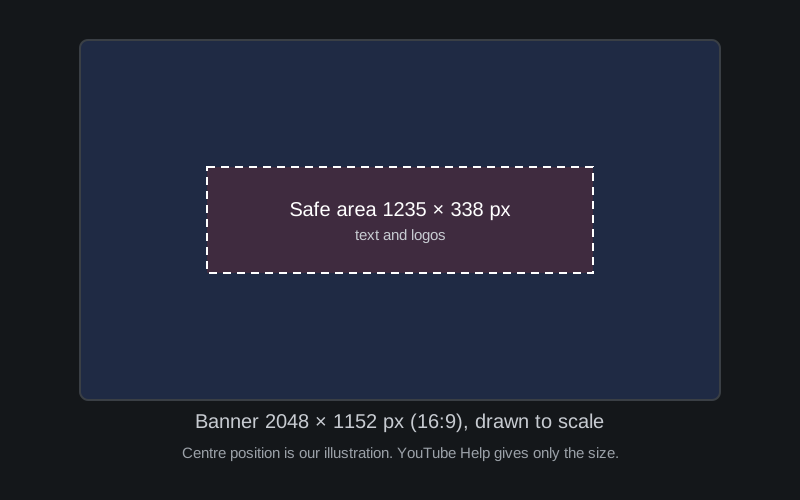
Drawn to scale. The size of the safe area comes from YouTube Help. Its centred position is our illustration.
The safe area is a small part of the whole image: about 60% of the width and under 30% of the height. That is why designs that place a tagline near the top or bottom edge can get cut off on some screens.
Checking a banner that already exists
You do not need to guess what a successful channel uses. Open a few channels in your niche on a phone and on a computer and look at where their text sits. Our Thumbnail Downloader does not fetch banners: it saves a video's thumbnail and a channel's profile image, so use it for those and not for channel art. Whoever made a banner owns it, so study layouts and do not reuse someone else's image.
If you design at the recommended 2560 × 1440, keeping the same proportions puts the safe area at roughly 1544 × 423 pixels. That is our own arithmetic, assuming the area scales in proportion, so confirm it against a real channel page. Our Banner Template Maker draws that canvas with the area marked and exports a PNG or JPEG, all in your browser.
- 01
Start from the recommended size
Design at 2560 × 1440 pixels so the banner holds up on a television, then keep the file at 6 MB or less.
- 02
Keep text and logos inside the safe area
The safe area is 1235 × 338 pixels at the minimum size. Scale it in proportion if you design at a larger size.
- 03
Leave out shadows, borders and frames
YouTube Help asks you not to add them to the file.
- 04
Check it on more than one device
Look at your channel page on a phone, a computer and, if you can, a TV. The crop differs on each.
Confidence note
All sizes and limits above come from YouTube Help. YouTube changes its channel layouts, so a banner that looks right today may crop differently after a redesign. The centred position of the safe area in our diagram is an illustration, not a specification.
FAQ
What is the best YouTube banner size?
YouTube Help gives 2048 × 1152 pixels as the minimum and 2560 × 1440 as the recommended size, especially for TV. Both are 16:9.
How big can the banner file be?
YouTube Help says 6 MB or smaller.
Why is my banner cut off on my phone?
YouTube Help says the image will be cropped on certain views and devices. Keep text and logos inside the safe area of 1235 × 338 pixels.
What size should my profile picture be?
The tips page we read says only that it is best to upload a square or round image. It does not give exact dimensions in the text we read.
Related reading
Sources
- YouTube Help: Manage your channel branding
- YouTube Help: Channel banner & profile picture tips