YouTube Thumbnail Size and Safe Zones in 2026
Published 2026-09-20 · 7 min read · Alexander, automation engineer
TL;DR
- YouTube's help page now recommends 3840 × 2160 pixels for video thumbnails (16:9), with a minimum width of 640 pixels, saved as JPG or PNG.
- The file size limit depends on where you upload from: 2 MB in the mobile app, 50 MB on a computer.
- Shorts thumbnails are 2160 × 3840 (9:16), and custom Shorts thumbnails can only be added in YouTube Studio on a computer.
- A thumbnail that meets the size rules can still fail on screen. Check it at the small sizes viewers actually see.
Most thumbnail advice repeats one number: 1280 × 720 pixels, under 2 MB. We repeated it too. Our own Thumbnail Preview Simulator told people their file was too big above 2 MB until today, when we checked YouTube's help page and found that the numbers have moved. This article lists what YouTube publishes now, and then deals with the part the help page cannot: what your thumbnail looks like once it is shrunk into a search result or a sidebar.
The numbers YouTube publishes
These come from YouTube Help's "custom thumbnail" requirements. YouTube changes this page, so check it if you are about to build a template.
| Videos | Shorts | |
|---|---|---|
| Recommended resolution | 3840 × 2160 | 2160 × 3840 |
| Minimum size | 640 px wide | 640 px tall |
| Aspect ratio | 16:9 | 9:16 |
| File formats | JPG or PNG | JPG or PNG |
| Largest file, mobile app | 2 MB | n/a (computer only) |
| Largest file, computer | 50 MB | 50 MB |
Custom thumbnail requirements from YouTube Help
Two things follow from that table. The old 1280 × 720 file is still valid, because it is 16:9 and well above the 640-pixel minimum. It is just no longer the size YouTube recommends. And the 2 MB limit is real only when you upload from the phone app, which is why a file that a computer accepts can be refused by the app.
Your account also has to be verified before you can upload custom thumbnails at all.
What a thumbnail looks like once YouTube shrinks it
A 3840 × 2160 file is never shown that large. It is scaled into a handful of small slots, and the slot decides whether your design survives. We uploaded a deliberately simple test thumbnail (three words of large text and a play-style circle) to the simulator and looked at each layout.
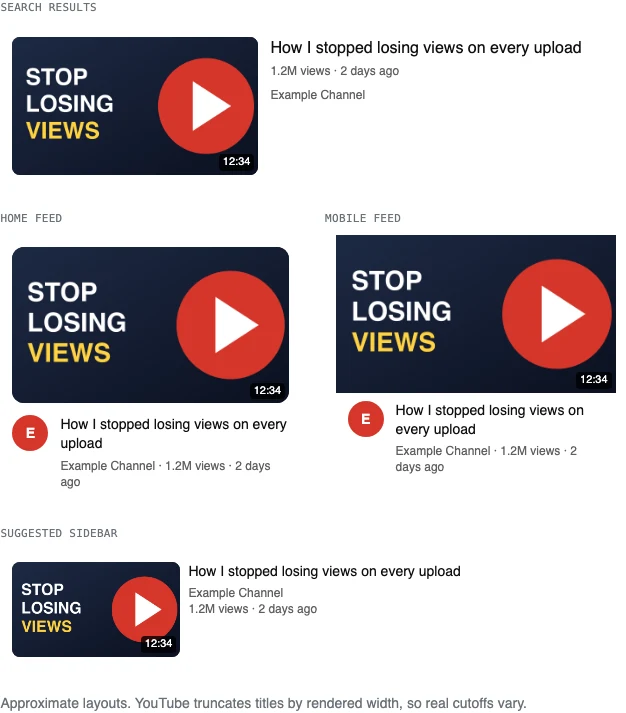
The simulator's four layouts for one test image. They are approximations of YouTube's cards, not screenshots of YouTube.
Three things stand out in that comparison.
- The sidebar version is the smallest, about 60% of the width of the home feed card in the simulator. Three words at a large size stay readable there. A fourth line of smaller text likely would not.
- The video length badge sits in the bottom-right corner of every layout. Anything you put in that corner, a logo or the last letters of a word, will be partly covered.
- The title is shown beside or below the image, not inside it. Whatever your thumbnail says, it should not repeat the title word for word, because the viewer reads both at once.
Where to keep text and faces
YouTube does not publish an official safe area, so this part is our recommendation and not a rule. A simple version that works with the layouts above:
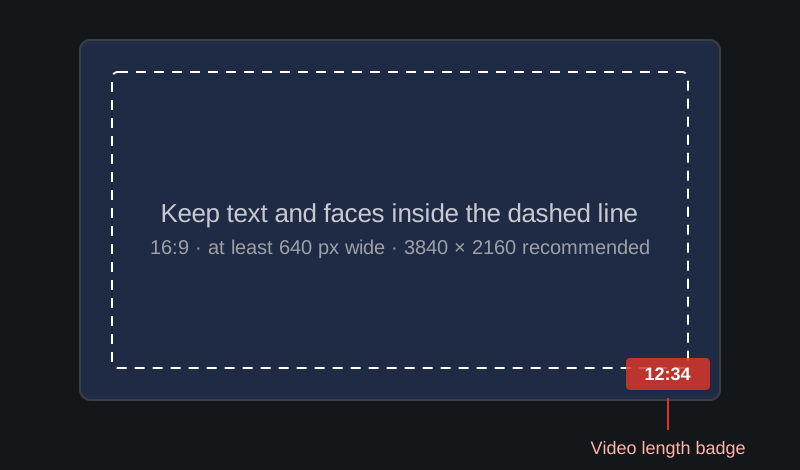
Keep the important part of the image inside the dashed line, and leave the bottom-right corner empty.
- Leave a margin of roughly 5% on every edge, so nothing important is cropped or crowded.
- Keep the bottom-right corner clear for the length badge.
- Use as few words as you can, and make them large. If a word is unreadable in the smallest layout, it is decoration.
Vertical videos and Shorts
YouTube's help page has one note that catches people out. Vertical videos that use a 16:9 custom thumbnail will be replaced by an automatically generated 4:5 thumbnail on the home, explore and subscription pages. Your custom thumbnail still appears on the watch feed, in watch history and on non-mobile platforms.
So if you publish vertical videos, a 16:9 thumbnail is not wasted, but it is not what most viewers will see on the home page either. The help page says Shorts thumbnails should be 9:16.
A quick check before you upload
- 01
Export at 16:9, at least 640 pixels wide
3840 × 2160 is what YouTube recommends. A 1920 × 1080 or 1280 × 720 file is still within the rules if that is what your template produces.
- 02
Save as JPG or PNG under the limit that applies to you
Under 2 MB if you might upload from the mobile app, under 50 MB from a computer. If a PNG is too heavy, a high-quality JPG is usually much smaller.
- 03
Look at it in the smallest layout first
Upload it to the Thumbnail Preview Simulator, which runs in your browser and does not upload the file anywhere. If the sidebar version is unreadable, simplify the image before you polish anything else.
- 04
Check the title next to it
A title that is cut off in search can hide the very word that makes the video make sense. The Title & Description Length Checker shows where the cuts fall.
Confidence note
The simulator's layouts are approximations. YouTube changes its interface often and truncates titles by rendered width, so the exact cut-off points and card sizes will not match pixel for pixel. The file checks follow YouTube Help. Nothing here predicts how many people will click a thumbnail. That depends on the video, the audience and the title, and no tool can promise it.
FAQ
Is 1280 × 720 still a good thumbnail size?
It is valid: it is 16:9 and above the 640-pixel minimum. YouTube's help page now recommends 3840 × 2160, so a larger export is the safer choice if your template allows it. We have not measured whether viewers can see a difference between the two.
What file formats can I use?
YouTube's help page lists image formats such as JPG or PNG. Stick to those two.
Why was my thumbnail cropped or replaced?
Check the aspect ratio first. A vertical video with a 16:9 custom thumbnail is replaced by an automatically generated 4:5 image on the home, explore and subscription pages. Outside that case, YouTube asks for 16:9 and an image with another ratio may be cropped or padded to fit.
Can I download a thumbnail from another video?
You can view and save public thumbnails with our Thumbnail Downloader, but a thumbnail belongs to whoever made it. Use it to study layouts, not to republish someone else's image.
Related reading
Sources
- YouTube Help: Add custom thumbnails on YouTube